
UNICODE TEXT GUIDE
Unicode Text Explained: How Copy-Paste Styles Work
Unicode text can make a short profile line, formula, or caption look different without installing a font. Here is what changes, why support is uneven, and how to test a result before you publish it.
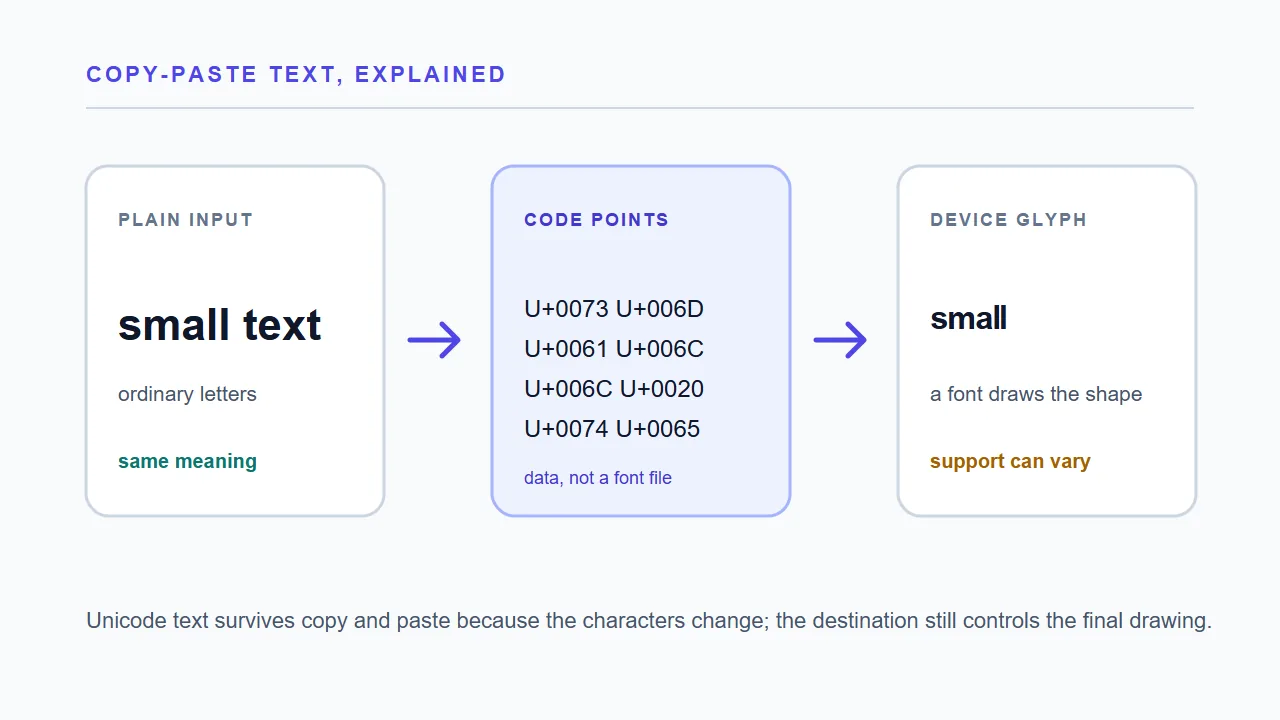
When people search for Unicode text, they are usually trying to solve a practical copy-and-paste problem. They have ordinary words and want a small, bold, superscript, subscript, or other distinctive version that can travel into a profile, chat, game status, or caption. A generator can provide that result instantly, but it helps to know what the output actually is.
The short answer is simple: a Unicode text style is a different sequence of characters, not a downloadable font and not a hidden CSS setting. The receiving app gets the new characters and then uses its own fonts to draw them. That is why the effect can survive a paste into a field with no formatting toolbar, while the exact appearance can still change from one device to another. This guide explains the code-point, coverage, accessibility, and compatibility boundaries that matter before you publish a result.
START WITH THE DATA
What does Unicode text mean?
Unicode is a shared system for naming characters so software can store and exchange them consistently. Each character is associated with a code point, written in a form such as U+0041 for the Latin capital letter A. A code point is data; it is not a picture. The picture you see on screen is a glyph supplied by a font and selected by the operating system or app.
A Unicode text generator uses a lookup table. It reads one input character at a time and, when a reliable styled character exists, outputs that character instead. A bold style can replace A with a mathematical bold A; a small-text style may combine modifier letters and superscript characters. The result can be selected, stored, and pasted, but its code points are no longer the same as the original letters. A destination must still allow the range and have a usable glyph.
- Code point: the number assigned to a character by Unicode.
- Glyph: the visible drawing selected from a font for that character.
- Mapping table: the rule that decides which input characters receive a styled replacement.
- Fallback: the original character kept when no dependable replacement exists.
Unicode text is therefore a data choice with a visual effect. It is not a new font file and it is not a CSS font-size change.
THE IMPORTANT DISTINCTION
Unicode characters versus fonts
A font changes the drawing of existing data. If you type the ordinary phrase small text and choose a decorative typeface, the stored letters are still s, m, a, l, l and so on. Copying that text into an app that does not preserve formatting usually produces ordinary letters. The visual choice belonged to the page or document that held the formatting.
Unicode text works at another layer. A generator replaces the letters with characters whose official names and code points are different. Mathematical alphabets, fullwidth forms, enclosed letters, modifier letters, and combining marks are common families. The receiving field only needs to accept the characters and find a font that can draw them. The trade-off is control: a real font gives consistent spacing and language coverage, while Unicode is best for a short optional label or notation, not a long paragraph.
- Use a font or CSS when you control the page and need predictable typography.
- Use Unicode text when the destination accepts plain characters but has little formatting support.
- Keep ordinary text alongside important content.
BEHIND THE CONVERTER
How Unicode text generators map styles
The conversion itself is usually deterministic. The page stores a map for each style and walks through the input. Lowercase a might become ᵃ in a superscript map, ᴀ in a small-caps map, or a mathematical bold character in a bold map. Spaces, line breaks, punctuation, emoji, and letters outside the map are normally copied as they are. The output does not need an API call or a language model.
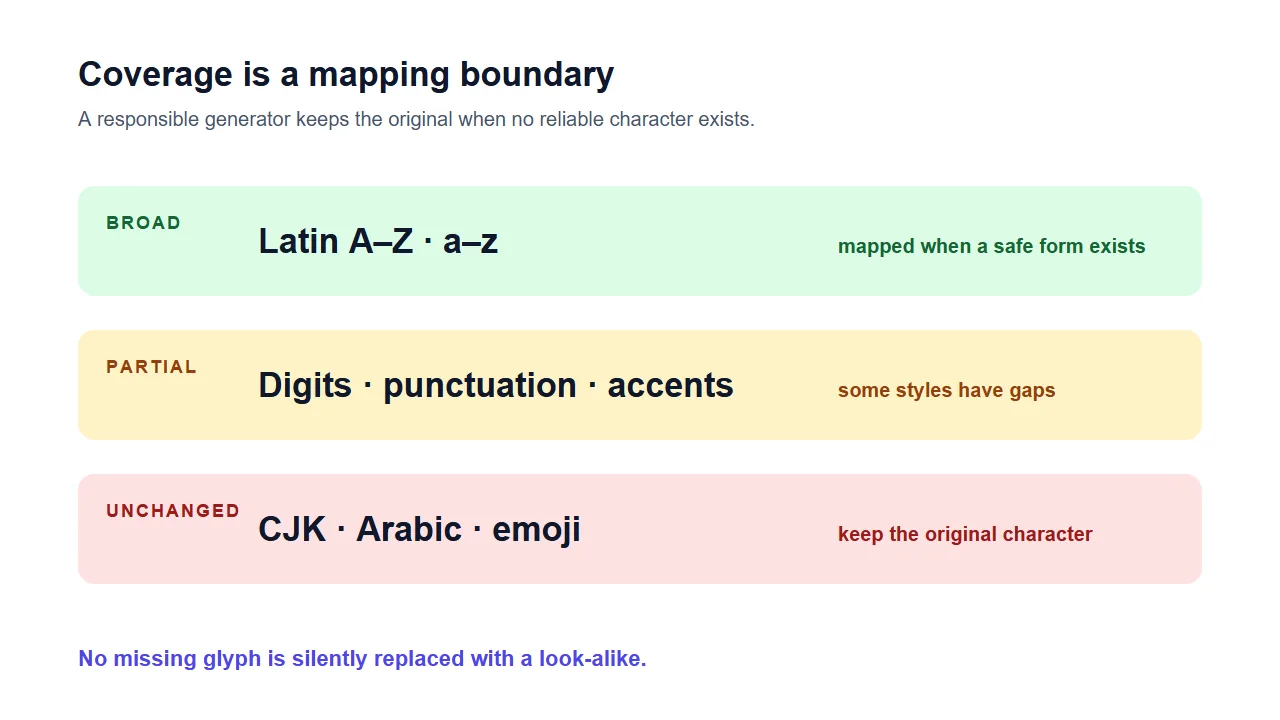
Different styles come from different Unicode blocks, so they do not have equal coverage. Mathematical alphabets are systematic for Latin and Greek; superscript and subscript sets contain many digits but fewer letters; small caps borrow characters that resemble capitals; upside-down text can reorder and substitute look-alikes. A careful tool leaves the original when no safe match exists, so a mixed result such as ᵗᵉˣᵗé protects spelling rather than silently dropping an accent.
The existing Small Text Generator lets you compare small text, small caps, superscript, and subscript in one browser session. The guide explains the mapping; the generator remains the action page.
COMPATIBILITY BOUNDARIES
Why do some Unicode characters stay unchanged?
Unchanged characters are usually a sign that the converter is preserving information. Unicode does not define a matching styled character for every letter, punctuation mark, emoji, or writing system, and a look-alike from another script can change how a word is searched or read. Basic Latin has the broadest support; digits, accents, and complex scripts are more uneven. A destination can add another boundary: a valid code point may show as an empty box when no usable glyph exists, or an app may filter and normalize it.
- A normal-sized letter in a styled word can be an intentional fallback.
- An empty square usually means the destination lacks a usable glyph, not that the code point disappeared.
- A destination filter can reject valid Unicode even when the preview looks correct.
BEFORE YOU PUBLISH
Normalization, search, and accessibility
Some systems apply Unicode normalization so compatibility characters compare more like ordinary text. NFKC can fold mathematical, fullwidth, or enclosed forms toward plain equivalents, so a destination may accept a styled string and later store a normalized version. Styled characters can also behave differently in search boxes, translation tools, and screen readers; assistive technology may announce unusual characters by name or skip a glyph. Keep the core message ordinary and avoid look-alikes used to impersonate accounts or bypass rules.
- Search and duplicate checks may not treat styled and ordinary text as equal.
- Screen readers can announce mathematical or modifier characters differently from visual readers.
- Plain text is the better default for legal names, addresses, instructions, passwords, and critical notices.
PRACTICAL USE
When Unicode text is a good fit
Unicode styles work best when the text is short, optional, and easy to verify. A profile can use a small caps role label next to a normal name. A chat can use a brief superscript expression. A caption can use one bold-looking line to separate a heading from its ordinary explanation. A chemistry or mathematics note may benefit from subscript digits because the notation itself carries meaning.
The common thread is a text-only destination with little formatting. Start with a correct sentence, convert only the part that needs emphasis, and paste a short sample into the real destination. If the app changes the result or limits the range, switch back to ordinary text. For a fast experiment, use Small Text Generator, Bold Text Generator, or Upside-Down Text Generator; this guide remains the explanation for choosing and checking a style.
A readable mixed result is often better than a fully decorated sentence. Emphasis should guide the reader, not turn every word into a puzzle.
CHOOSE THE RIGHT LAYER
Unicode text or a real font?
Both approaches change what a reader sees, but they solve different problems. Use this quick comparison before choosing a copy-and-paste style.
| Question | Unicode text | Font or CSS styling |
|---|---|---|
| What changes? | The stored characters and code points | The drawing of the same characters |
| Where it travels | Plain-text fields that accept the range | Pages or documents that preserve formatting |
| Coverage | Uneven; depends on the mapped block | Depends on the chosen font and script support |
| Main risk | Boxes, filtering, normalization, or readability loss | Formatting disappears outside the document |
| Best use | Short optional accents or notation | Accessible, consistent page typography |
A FIVE-STEP CHECK
Check Unicode text before you copy it
A quick test catches most surprises without requiring a character database or a developer tool.
- Keep the originalSave the ordinary sentence before converting it so you can edit, search, or restore it later.
- Choose one purposeUse superscript for a raised notation, subscript for a formula, or a small style for a short visual label.
- Review fallbacksLook for letters, accents, digits, or symbols that stayed normal. That is a coverage signal, not necessarily an error.
- Paste a short sampleTest the real profile, chat, form, or game field. Check the saved result again after reopening the destination.
- Keep meaning ordinaryUse plain text for anything people must read, search, translate, or enter accurately, and leave decoration optional.
COMMON QUESTIONS
Unicode text FAQ
Is Unicode text the same as changing a font?
No. A font changes how existing characters are drawn. Unicode text replaces some characters with different code points that look styled. That is why the effect can survive a paste into a plain-text field, while the destination still controls the final glyph.
Why does my small text generator leave a letter normal-sized?
The selected Unicode family may not contain a reliable equivalent for that letter, accent, symbol, or script. Keeping the original character avoids changing the spelling or borrowing a misleading look-alike. Mixed output is an honest compatibility result.
Can I use Unicode text in Instagram, Discord, or a game name?
Often, if the field accepts the characters and has a compatible font. Test a short phrase first because usernames, bios, and moderation systems can apply different limits or normalize the result.
Why do I see a square or tofu box after pasting?
The character is present, but the receiving device or font cannot draw a usable glyph. Try another current app or device and keep ordinary text for information that must remain readable.
Sources and further reading
- OpenL: Fancy Text Generator ExplainedUnicode styles, coverage, glyph fallback, and normalization overview.
- Unicode Text Tools: Unicode Text vs FontsCopy-paste use cases, accessibility cautions, and a practical checklist.